Resource Planning
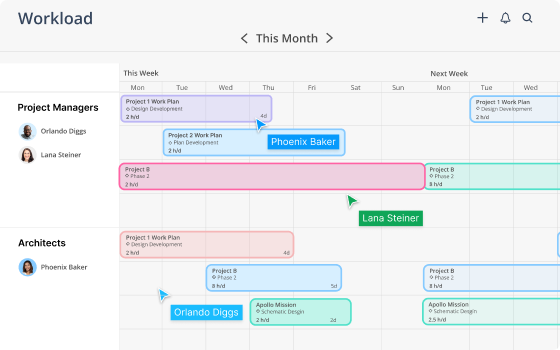
The Planner space gives you a project- by-project timeline where you can drag and drop staffing bars, set milestones, and create work plans with dependencies. Build a template once, then clone it across similar projects.
"Our resource meetings went from an average of 30 minutes to an average of five minutes."
Stella Nicolet
Managing Principal, Architecture
.svg)
Capacity Planning
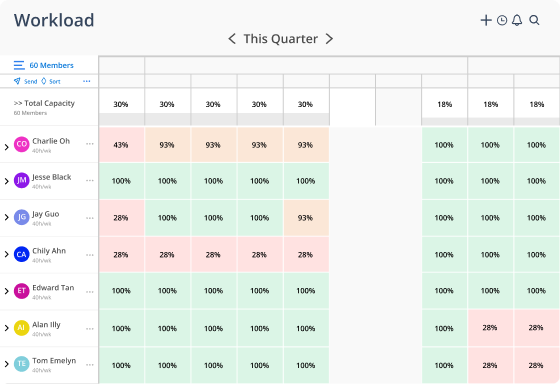
The Workload space gives you a member-by-member heat map of your entire firm's capacity. Filter by office, department, role, or discipline. See available hours by day, week, or month.
"Our resource meetings went from an average of 30 minutes to an average of five minutes."
Jazmyn Baker
IT Portfolio Manager, AssistRx

Resource Allocation
Team Builder lets you search across the entire firm by skills, certifications, experience, availability, and interests.
Put the right people on the right work, whether they're in your office or three states away.
"Everybody on my teams agrees the forecasting is great. Nobody wants to make a change there. We get a lot out of it on the forecasting side."
Craig Walters
Engineering Manager, ICON Engineering

Resource Forecasting
Forecast future demand against current capacity so you can hire proactively, plan for slow periods, and give leadership confidence to make decisions months in advance — not days.
"I meet with all the partners to review their projects every month. It was good for them to see what the PMs are seeing."
Abigail Mountain
Operations Manager, Strada Architecture
.svg)
Resource Analytics
The Budget space tracks fee, spend, planned, and remaining hours for every project in real time. Compare estimates to actuals. Powered by AI for the insights you didn't know to look for.
"I'm using it to forecast revenue for the entirety of 2026. We've tried to imply the importance of it in more than just what are you doing next week — it's helping us paint a picture of a year in advance."
Chris Kretovic
Department Manager, Fishbeck






.png)
.png)

.png)