

Project management software vs. resource management software
Project management tools track the tasks inside each project. Resource management software plans the people across every project: who works on what, and when, and what that means for utilization, revenue and hiring. For project-driven businesses, project and resource management go hand in hand, and that takes a different tool. Mosaic, an AI project and resource management tool, does both in one plan.
Most firms already run a project management tool, and many keep it. The question is where the firm manages its people and its forecasts. We make Mosaic, so this page says what each one does well.
What’s the difference between project management software and resource management software?
Project management software organizes the tasks inside a project for the team doing them. Resource management software decides who works on which project, week by week, across the whole firm, and what that means for utilization, revenue and hiring. Most task tools carry no lens of time: billable hours, cost and bill rates, or a firm-wide view of workload.
| What matters | A project management tool | Mosaic |
|---|---|---|
| Built for | The team doing the tasks | The leaders who plan people, projects and the firm |
| The ERP | Usually not connected | An integration Mosaic builds and runs: enterprise grade, with 99.9% reliability |
| Plans | Tasks, due dates and owners | People by role, skill and availability, across every project |
| Time | Due dates, and sometimes time tracking | Billable and non-billable hours, with cost and bill rates |
| Workload | Per project or per board | Firm-wide, by person, role and office, weeks ahead |
| Forecasts | No, at most a single project | Revenue, utilization and hiring from the live plan |
Do firms need both a project management tool and Mosaic?
Some do and some don’t. Firms that already have a process or system in place for their tasks, and want to keep it, keep their project management tool and plan people and forecasts in Mosaic above it. Firms whose projects run by phase and budget often do both in Mosaic.
Mosaic doesn’t compete with a task tool on task management. It uses the tasks to plan: through its integrations, Mosaic can mirror the tasks from other systems such as Jira and Asana, so the firm can manage and understand the time they take.
Tasks, boards and due dates for the team doing the work.
People, projects and forecasts for the whole firm, with project management built in.
Mosaic does project management too:
- Phases, sub-phases and milestones
- Budgets by phase, in hours and fees
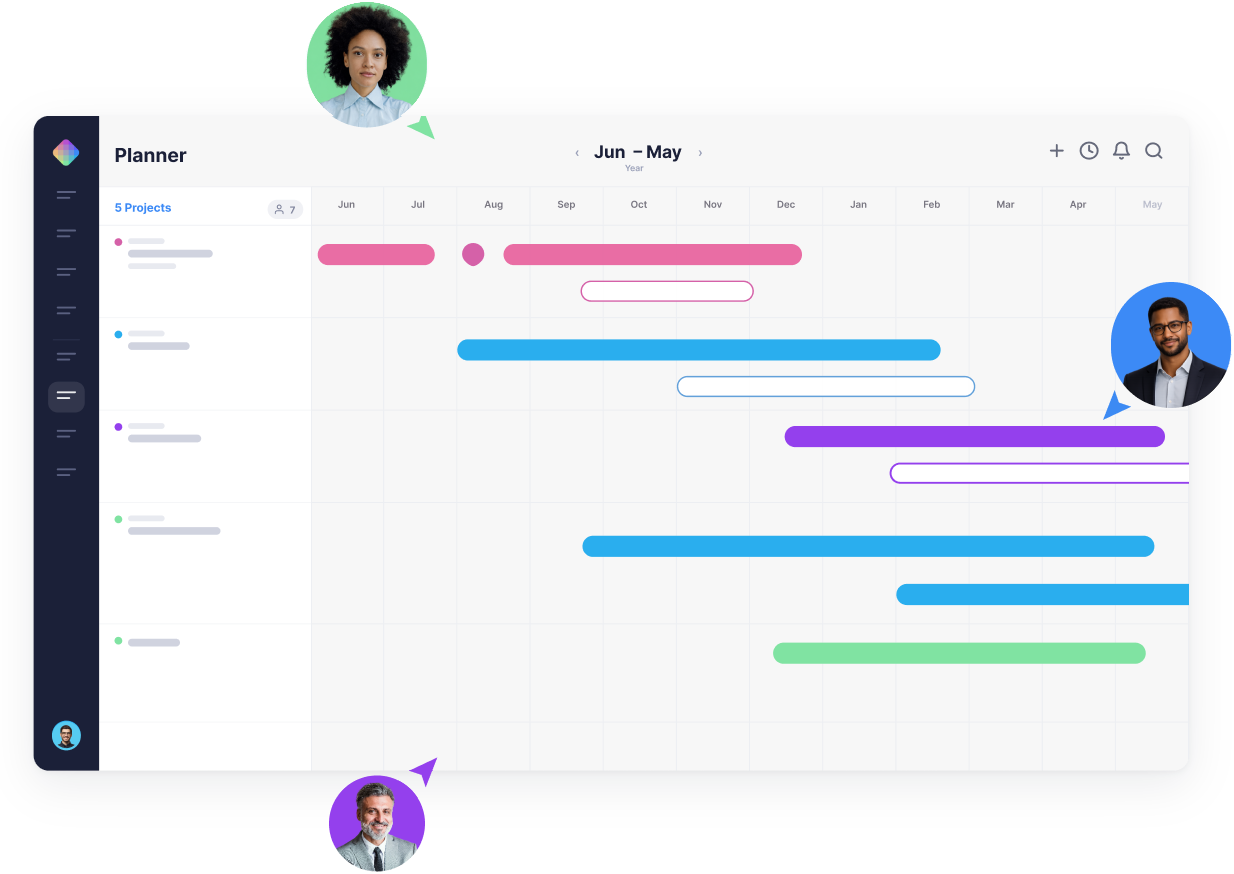
- Full, shareable Gantt chart schedules, with dependencies
- Tasks and task lists
- Tasks mirrored from systems such as Jira and Asana, with the time they take
- Patented automatic rescheduling when dates move
What does resource management add to project management?
What a firm needs above its projects, and the reasons firms add Mosaic.

An ERP integration we build and run
Enterprise grade, with 99.9% reliability: Mosaic reads projects, people, roles, rates, budgets and actual hours from your ERP, and maintains the connection itself.

A lens of time
Billable and non-billable hours, cost and bill rates, so the plan shows utilization, not just due dates.

One view of the firm
Workload by person, role and office across every project, weeks ahead.

Forecasts
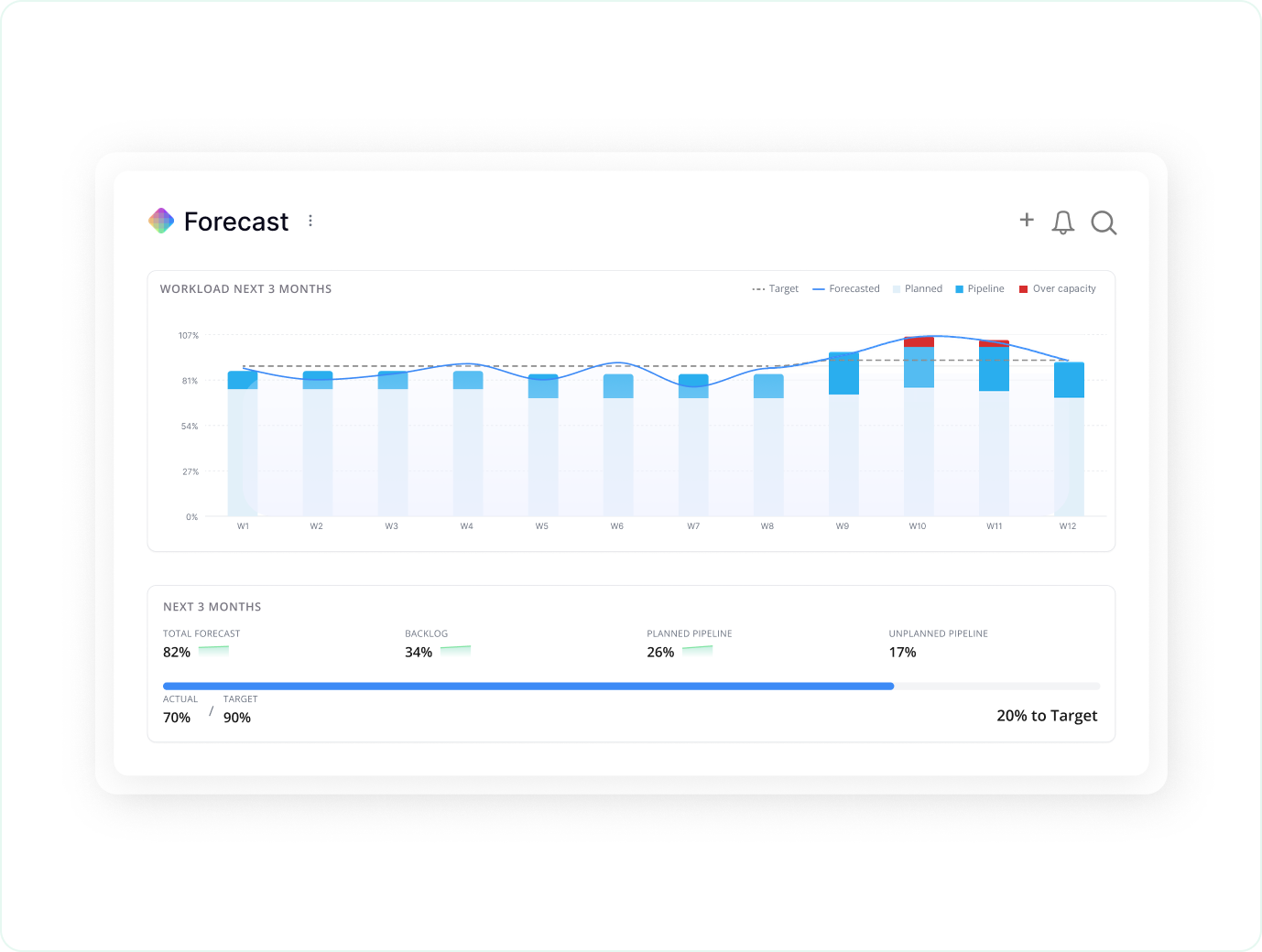
Revenue, utilization and hiring forecast from the live plan, with scenarios side by side.
Chello in Microsoft Teams
Mosaic’s AI planning assistant asks each manager for updates where they already work, and changes nothing without approval.

Patented rescheduling
When a phase’s dates change, the work after it and the people on it move with it.
Can project management software forecast revenue and hiring?
No. A project management tool may forecast a single project, but that isn’t the point of the tool, and forecasting the firm with AI isn’t its purpose either: it plans tasks, not hours by role and rate. Mosaic forecasts from the plan: hours planned on every project, by role and bill rate, give revenue by month, and demand by role against capacity shows when to hire.
Within four months on Mosaic, a firm’s next-quarter forecast can be accurate to within about 3% to 4%.
What results have firms seen with Mosaic?
Firms on Mosaic plan 80% or more of their billable staff capacity, against under 50% at typical firms on ERPs and spreadsheets, and a quarter of them report their most profitable year ever. CetraRuddy went from 77% to 90% utilization in its best year in 38 years, and CPL spends 75% less time managing resources.
Source: Mosaic planning data · CetraRuddy and CPL, Mosaic customers
80%+
of billable staff capacity planned at firms on Mosaic
90%
utilization at CetraRuddy, up from 77%
75%
less time managing resources at CPL
Do we have to give up our project management tool?
No. Teams can keep tracking tasks where they do today, and plan the people and the forecasts in Mosaic. Firms whose projects run by phase and budget often move their schedules into Mosaic as well.
To switch, Mosaic imports your data, typically within 48 hours, and the ERP integration is in place within days. Firms are trained and live in 30 to 60 days.
Mosaic vs. all-in-one work management tools · Project management software for A&E firms · Resource planning for Jira teams
- Connect Mosaic to the ERP, which brings in projects, people, roles, rates, budgets and actual hours.
- Each manager plans the next few weeks: who works on what, and how much of each person’s time is billable.
- Keep tasks in the project management tool, or move schedules into Mosaic’s Gantt view.
- Retire the planning spreadsheets once managers update the plan instead.

“As a PM group, we meet every Thursday and go through each person individually on Mosaic to help when people get overloaded and make sure their workload is balanced.”
For firms that live and die by planning
Mosaic is for project-driven firms that value project and resource planning, management and forecasting. When people are your most valuable resource, and they determine what you can get done and when, you want the best tool for the job: one that gives you control over delivery when deadlines matter. Without one, firms leave $10k to $20k per employee on the table every year: the profit in five more points of utilization, according to the Resource Management Institute. And there’s much more to lose.
How is Mosaic priced?
Mosaic is priced in annual parts: a per-seat subscription, a platform fee and an optional ERP integration, which Mosaic owns and maintains. Onboarding and implementation is a one-time cost, scoped to the firm’s rollout, and the team sets out all of it in one quote. Firms who plan on Mosaic typically see 10 to 20x ROI in a full year, and full-priced plans are backed by a 5x money-back guarantee. The return comes from staffing projects before the work starts rather than after.
The per-seat rate steps down as headcount increases, and the platform fee funds onboarding, training, a Customer Success Manager, support and hosting.
Speak to the team to learn more.
What else do firms ask about project and resource management software?
Is Mosaic resource management software?
Yes. Mosaic plans, manages and forecasts the people across every project, with project management in the same plan: who works on what, utilization, revenue and hiring.
Is Mosaic a project management tool?
It does project management for planning: phases, budgets, Gantt schedules and tasks, in the same plan as the people, with forecasts built from it. Firms with a task process or system they want to keep often keep their task tool beside it, and Mosaic can mirror its tasks.
Does Mosaic replace Asana, monday.com or ClickUp?
Not always. Mosaic plans people, projects and forecasts across the firm. Firms with a task process or system they want to keep often keep their work management tool for that.
How long does it take to switch?
To switch, Mosaic imports your data, typically within 48 hours, and the ERP integration is in place within days. Firms are trained and live in 30 to 60 days.
Is Mosaic SOC 2 Type II?
Yes. Mosaic is SOC 2 Type II, uses encrypted, read-only ERP credentials and single sign-on, and its AI is never trained on your data.
Book a 20-minute demo
See your projects and people managed in one place, with forecasts built from the plan.